



Building a custom gaming PC has never been easier, thanks to the revolutionary AI PC Builder. Whether you’re a complete beginner looking to build your first gaming rig or an experienced enthusiast seeking the perfect component combination, finding the right platform can make all the difference. In this comprehensive guide, we’ll explore why the AI PC Builder stands out as the best website for gaming PCs and how it can help you create your dream gaming setup without the usual headaches of compatibility issues and technical complexity.
Table of contents
- Why Build Custom PCs for Gaming?
- Best Website for Gaming PCs: Introducing the AI PC Builder
- Two Powerful Modes for Every Skill Level
- SUGGEST A BUILD Mode: Perfect for Beginners
- ADD COMPONENTS Mode: Designed for Experienced Builders
- Intelligent Compatibility Management
- Free Access Without Registration
- Build a PC in Seconds by Selecting a Use Case and Setting a Budget
- Budget-Based Optimization
- Platform Selection: Intel vs AMD
- Use Case Optimization
- Ability to Save Builds
- Public Build Gallery
- Build Editing and Iteration
- Social Sharing Features
- Purchase Integration
- Ability to Email Builds to Self
- Permanent Record Keeping
- Cross-Device Accessibility
- Easy Sharing with Others
- Reference During Building Process
- Concluding Thoughts
Why Build Custom PCs for Gaming?
The world of gaming has evolved dramatically over the past decade, with increasingly demanding titles requiring more powerful hardware to deliver optimal performance. While pre-built gaming computers offer convenience, building a custom PC provides numerous advantages that serious gamers simply cannot ignore.
Cost Effectiveness and Value
One of the most compelling reasons to build a custom gaming PC is the significant cost savings compared to pre-built alternatives. When you purchase a pre-built gaming computer, you’re not only paying for the components but also for assembly, marketing, brand markup, and retailer profits. By selecting and assembling components yourself, you can often build a more powerful system for 20-30% less than equivalent pre-built options.
Custom builds also allow you to allocate your budget more intelligently. Instead of paying for unnecessary features or components that don’t enhance gaming performance, you can invest more heavily in critical gaming components like the graphics card and processor while economizing on areas that have minimal impact on gaming experience.
Performance Optimization
Pre-built gaming computers often make compromises to hit specific price points or maintain profit margins. These compromises might include pairing a high-end processor with inadequate cooling, using slower RAM, or including a power supply that barely meets minimum requirements. When building custom, you have complete control over every component, ensuring optimal performance and reliability.
Gaming performance depends heavily on component synergy. A custom build allows you to select components that work together harmoniously, avoiding bottlenecks that can limit overall system performance. You can also choose components specifically optimized for your favorite games or gaming genres.
Future-Proofing and Upgradeability
Gaming technology advances rapidly, and what’s cutting-edge today may struggle with tomorrow’s games. Custom-built PCs are inherently more upgradeable than pre-built systems. When you build your own PC, you understand exactly what components you have and how they can be upgraded over time.
Pre-built systems often use proprietary components or configurations that limit upgrade options. Custom builds use standard components that can be easily replaced or upgraded as needed, extending the useful life of your gaming system and providing better long-term value.
Learning and Satisfaction
Building a custom gaming PC provides valuable technical knowledge and a deep understanding of how computers work. This knowledge proves invaluable for troubleshooting issues, optimizing performance, and making informed upgrade decisions. The satisfaction of successfully building and configuring your own gaming system is an experience that many enthusiasts find deeply rewarding.

Build a Music Production PC in 2025 – Full Guide
Want to set up a home music studio, here’s our guide on building a PC for Music production.
Best Website for Gaming PCs: Introducing the AI PC Builder
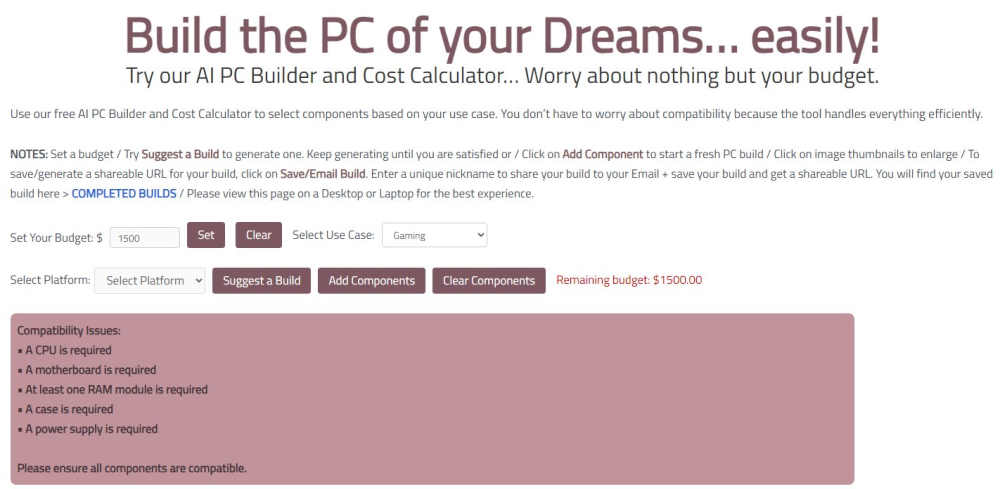
The AI PC Builder represents a revolutionary approach to custom PC building, combining the benefits of custom builds with intelligent automation that eliminates traditional barriers to entry. One of the best websites for building a gaming pc, this innovative platform addresses the biggest challenge facing potential PC builders: component compatibility and selection complexity.
Two Powerful Modes for Every Skill Level
The AI PC Builder features two distinct modes designed to serve both beginners and experienced builders effectively. This dual approach ensures that regardless of your technical expertise, you can successfully create a custom gaming PC that meets your specific needs and budget.
SUGGEST A BUILD Mode: Perfect for Beginners
The SUGGEST A BUILD mode revolutionizes PC building for newcomers by generating complete, compatible builds based on simple user inputs. This mode is specifically designed for beginners and inexperienced builders who may feel overwhelmed by the vast array of component choices and compatibility requirements.
When using the SUGGEST A BUILD feature, users simply need to specify their budget, preferred platform (Intel or AMD), and primary use case. The AI then analyzes these parameters and generates a complete build recommendation that includes all necessary components: processor, motherboard, RAM, storage, graphics card, power supply, and case.
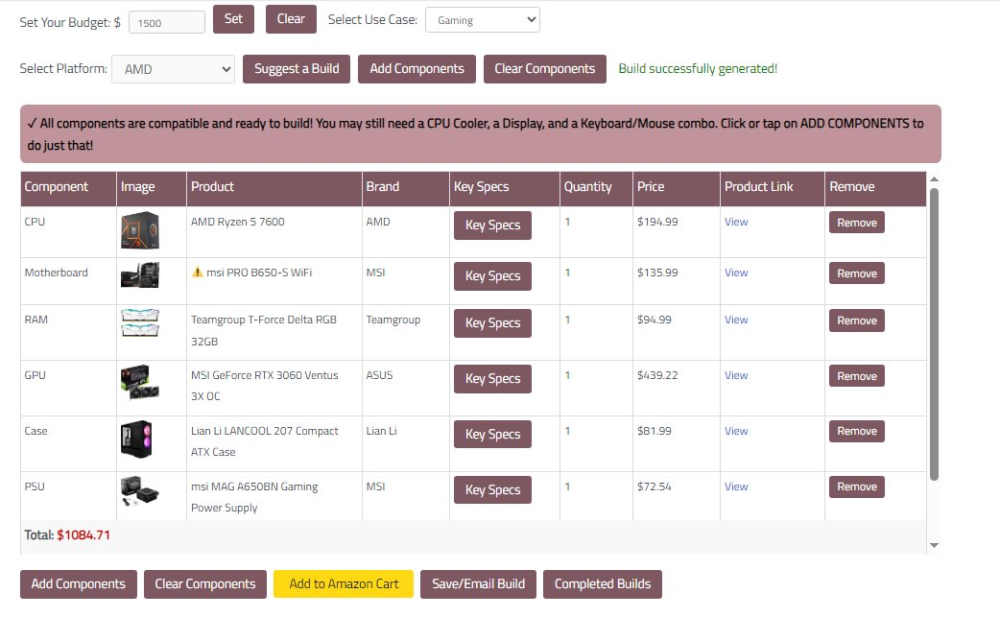
The beauty of this system lies in its simplicity and reliability. Users don’t need to understand the intricacies of socket types, power requirements, or form factor compatibility. The AI handles all these technical considerations behind the scenes, ensuring that every suggested build is not only compatible but optimized for the specified use case and budget.
The SUGGEST A BUILD function can be used repeatedly, allowing users to explore different configurations and price points. Each generated build represents a viable, balanced system that will deliver excellent performance for the intended purpose. This iterative approach helps users understand how different budget levels affect component selection and overall system capabilities.
ADD COMPONENTS Mode: Designed for Experienced Builders
Experienced PC builders often have specific preferences for brands, models, or particular components based on their knowledge and past experiences. The ADD COMPONENTS mode caters to these users by providing complete control over component selection while maintaining the AI’s compatibility checking capabilities.
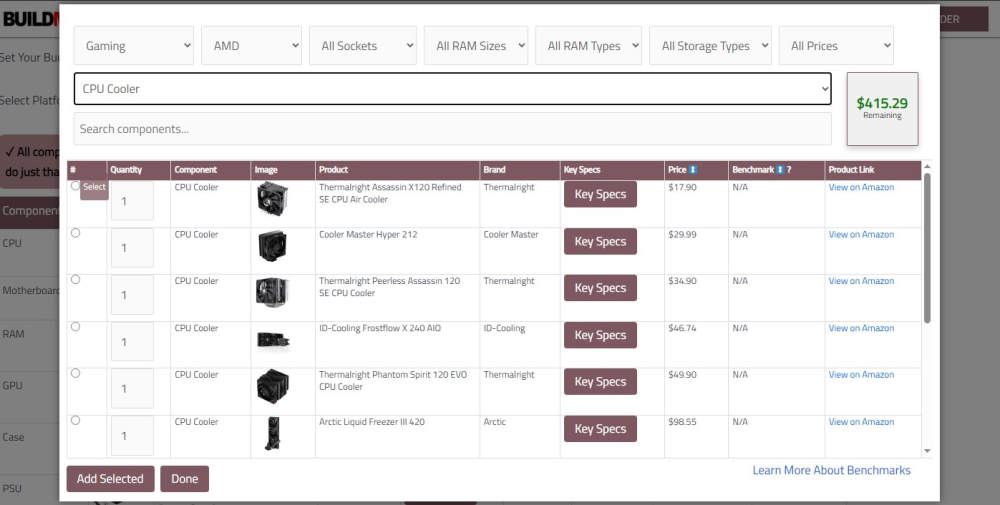
This mode allows users to build their system component by component, selecting exactly the parts they want. As each component is added, the AI continuously monitors compatibility, alerting users to potential issues before they become problems. This approach combines the flexibility that experienced builders demand with the safety net of intelligent compatibility checking.
Users can mix and match components from different manufacturers, compare different options within the same category, and create truly customized builds that reflect their specific requirements and preferences. Whether you’re building a high-end gaming rig with specific cooling requirements or a budget build with carefully selected value components, the ADD COMPONENTS mode provides the flexibility you need.
Intelligent Compatibility Management
One of the most significant advantages of the AI PC Builder is its sophisticated compatibility engine. Component compatibility is one of the most challenging aspects of PC building, requiring knowledge of numerous technical specifications and standards. The AI handles this complexity automatically, ensuring that every build recommendation or custom configuration is fully compatible.
The system understands the relationships between different components, including socket types, power requirements, physical dimensions, and performance characteristics. This knowledge prevents common mistakes like selecting a processor that doesn’t fit the chosen motherboard, or choosing a graphics card that exceeds the power supply’s capacity.
Free Access Without Registration
The AI PC Builder removes barriers to entry by providing full access to its features without requiring user registration. This approach reflects the platform’s commitment to making PC building accessible to everyone, regardless of their willingness to create yet another online account. This makes it the best site for building a gaming pc.
Users can immediately begin exploring build options, comparing configurations, and learning about components without any preliminary steps or commitments. This accessibility encourages experimentation and learning, helping users become more confident and knowledgeable about PC building.
Build a PC in Seconds by Selecting a Use Case and Setting a Budget
The AI PC Builder’s streamlined build generation process transforms what was once a time-consuming research project into a simple, efficient experience. By focusing on the most important factors: budget, platform preference, and intended use, the system can quickly generate optimal build recommendations.
Budget-Based Optimization
Budget is often the primary constraint when building a gaming PC, and the AI PC Builder excels at maximizing performance within any budget range. The system understands how to allocate budget across different components to achieve the best possible gaming performance for the specified amount.
For lower budgets, the AI prioritizes essential gaming components like the graphics card and processor while selecting adequate but economical options for other components. As budgets increase, the system intelligently scales up component quality, adding features like faster storage, better cooling, or higher-capacity RAM that enhance the overall gaming experience.
Platform Selection: Intel vs AMD
The choice between Intel and AMD platforms has significant implications for build configuration, and the AI PC Builder respects user preferences while optimizing within the chosen ecosystem. Both platforms offer excellent gaming performance, but they have different strengths and characteristics that may appeal to different users.
Intel platforms often provide slightly higher single-threaded performance, which can benefit certain games, while AMD platforms typically offer better multi-threaded performance and value proposition. The AI understands these nuances and selects appropriate components regardless of platform choice.
Related Article

PC Build for Cyberpunk 2077
Build a kick-ass PC for Cyberpunk 2077, Intel or AMD, all budgets covered. Fully Customizable.
Use Case Optimization
Different computing tasks have different hardware requirements, and the AI PC Builder recognizes eight distinct use cases, each with its own optimization strategy:
Gaming builds prioritize graphics performance and smooth frame rates, typically allocating a larger portion of the budget to the graphics card while ensuring adequate CPU performance to avoid bottlenecks.
Streaming configurations require additional CPU power for encoding while maintaining gaming performance, often featuring more powerful processors and additional RAM for multitasking.
Content Creation builds emphasize CPU performance, RAM capacity, and fast storage for handling large media files and complex editing tasks.
Workstation configurations are optimized for professional applications, often featuring ECC memory, professional graphics cards, and enhanced reliability features.
Web Server builds focus on efficiency, reliability, and appropriate I/O capabilities for hosting web applications.
Crypto Mining setups prioritize GPU performance and power efficiency for cryptocurrency mining operations.
Plex Server configurations emphasize storage capacity, network connectivity, and transcoding capabilities for media streaming.
Office PC builds focus on cost-effectiveness and energy efficiency for basic productivity tasks.
Each use case optimization ensures that the generated build will excel at its intended purpose while remaining within budget constraints. Though there are numerous websites that build pcs for you, the AI PC Builder stands out in this regard.
Ability to Save Builds
The AI PC Builder’s save functionality adds considerable value by allowing users to preserve their build configurations for future reference, comparison, or purchase. This feature enhances the platform’s utility as both a research tool and a practical building resource.
Public Build Gallery
Saved builds become part of a public gallery accessible through the Completed Builds page, creating a valuable community resource. This gallery serves multiple purposes: it provides inspiration for new builders, demonstrates real-world build examples across different budgets and use cases, and showcases the variety of configurations possible through the platform.
The public nature of saved builds encourages users to create well-thought-out configurations and provides transparency about build quality and component selection. Users can browse through builds similar to their requirements, learning from others’ choices and potentially discovering component options they hadn’t considered.
Build Editing and Iteration
Saved builds aren’t static; they can be edited and modified as needs change or new components become available. This flexibility is particularly valuable for users who want to track how their requirements evolve over time or experiment with different upgrade paths.
The ability to edit saved builds also makes them useful as starting points for new configurations. Users might save a baseline build and then create variations with different graphics cards, storage configurations, or other modifications to compare options or adapt to changing budgets.
Social Sharing Features
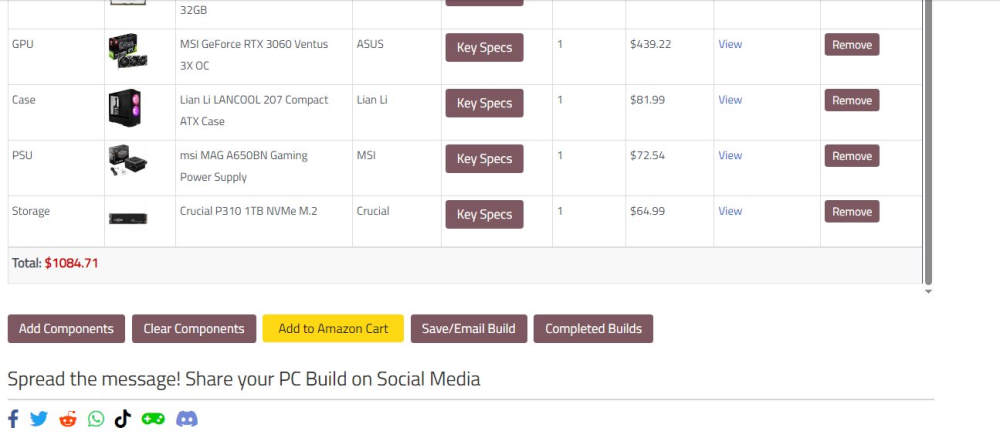
The platform’s sharing capabilities extend the utility of saved builds beyond individual use. Users can share their configurations on social media platforms, gaming forums, or with friends seeking build advice. This social aspect helps build a community around the platform and provides valuable feedback mechanisms for build quality.
Sharing features also make the AI PC Builder useful for content creators, system integrators, or anyone who regularly discusses PC builds with others. Instead of manually listing components or creating screenshots, users can simply share a link to their saved build.
Purchase Integration
Perhaps most importantly, saved builds include direct purchase links through Amazon, streamlining the transition from planning to actual building. This integration eliminates the need to manually search for and verify component availability and pricing across multiple retailers.
The purchase integration respects user choice while providing convenience, and the platform continues to expand marketplace options to provide users with more purchasing flexibility and competitive pricing.
Ability to Email Builds to Self
The email functionality adds another layer of convenience and accessibility to the AI PC Builder platform. This feature addresses practical needs around build preservation, sharing, and cross-device access.
Permanent Record Keeping
Emailing builds to yourself creates a permanent record that exists independently of the website. This backup approach ensures that you won’t lose your build configurations even if you forget to bookmark them or if browser data is cleared. Email records are particularly valuable for builds that you might reference months or years later when considering upgrades or building similar systems.
The email format typically includes all component details, specifications, and current pricing, creating a comprehensive snapshot of the build at the time it was generated. This historical information can be valuable for tracking price changes, component availability, or performance evolution over time.
Cross-Device Accessibility
Email functionality enables seamless access to builds across different devices. You might generate a build on your work computer during lunch break, email it to yourself, and then review it on your phone or home computer later. This flexibility accommodates modern usage patterns where users often switch between devices throughout the day.
Easy Sharing with Others
While the platform includes social sharing features, email remains the most universally accessible sharing method. You can easily forward build emails to family members, friends, or technical advisors who might provide input on component selection or help with the building process.
Email sharing is particularly useful when seeking advice from experienced builders or when collaborating with others on build decisions. The comprehensive component information in the email provides all necessary details for informed feedback.
Reference During Building Process
Having build details in email format provides a convenient reference during the actual building process. You can access component information and specifications on your phone while working on the physical build, without needing to keep a computer browser window open or print out component lists.
Related Article

Best Gaming PC Build for all Budgets – Full Guide
We take you through our best guide yet on the best gaming PC build for all budgets.
Concluding Thoughts
The AI PC Builder represents a significant advancement in making custom PC building accessible, efficient, and reliable for users of all skill levels. By combining intelligent automation with user choice, the platform eliminates traditional barriers while preserving the benefits that make custom building appealing.
Democratizing PC Building
Perhaps the most significant contribution of the AI PC Builder is its role in democratizing PC building. Previously, building a custom PC required considerable technical knowledge, extensive research, and confidence in component compatibility decisions. The AI PC Builder reduces these barriers while maintaining the core benefits of custom building: cost savings, performance optimization, and upgrade flexibility.
This accessibility is particularly important in today’s gaming landscape, where hardware requirements continue to increase and pre-built systems often represent poor value propositions. By making custom building accessible to beginners, the platform empowers more gamers to get better performance for their money.
Continuous Learning and Improvement
The AI PC Builder serves not just as a tool but as an educational platform. Users naturally learn about component relationships, performance characteristics, and build optimization through the process of generating and comparing different configurations. This knowledge proves valuable for future upgrades, troubleshooting, and build modifications.
The platform’s approach encourages experimentation and exploration without risk, helping users develop confidence and expertise over time. Even users who start with the SUGGEST A BUILD feature often graduate to using ADD COMPONENTS as they become more comfortable with PC building concepts.
Future of PC Building
The AI PC Builder points toward the future of PC building tools: intelligent, accessible, and focused on user outcomes rather than technical complexity. As component ecosystems continue to evolve and become more complex, AI-driven compatibility checking and optimization will become increasingly valuable.
The platform’s free access model and comprehensive feature set establish a new standard for PC building tools. By providing professional-grade functionality without cost barriers, it encourages more people to explore custom building and experience its benefits firsthand.
Getting Started
For anyone considering building a custom gaming PC, the AI PC Builder provides an ideal starting point. Whether you’re a complete beginner looking for your first gaming build or an experienced builder seeking a more efficient workflow, the platform offers tools and features that will enhance your building experience.
The combination of intelligent automation, comprehensive compatibility checking, and flexible build management makes the AI PC Builder the best website for gaming PCs currently available. By removing traditional barriers while preserving user choice and control, it represents the evolution of PC building tools for the modern era.
Building a custom gaming PC no longer requires extensive technical expertise or time-consuming research. With the AI PC Builder, you can create optimized, compatible builds in seconds, save and share your configurations, and transition seamlessly from planning to purchasing. The platform truly delivers on its promise of making custom PC building accessible to everyone, regardless of experience level or technical background.
Did this article meet your expectations? We have build guides for self-building your PC, and many more guides covering many use cases. Leave your reaction in the comments below.
All Articles